Quote Controls
Overview
A QuoteControl (KsQuoteEngine.QuoteControl) is the per-instrument, per-tier record that governs how Quote Engine produces a quote. Every instrument that Quote Engine prices has one QuoteControl per tier.
QuoteControls are persisted in the database and re-published on startup so changes survive restarts.
QuoteControl Fields
| Field | Description | Example |
|---|---|---|
| instrumentId | Platform instrument ID. Read-only. | BUSD00001 |
| tier | Tier number (1…n). Read-only. | 1 |
| enabled | When false, Quote Engine suppresses output for this instrument/tier | true |
| firm | When true, the published quote is marked as binding/firm | true |
| spreadType | How bid/ask spreads are interpreted and applied. One of: YIELD, PRICE | YIELD |
| bidSpread | Spread to apply to the bid side of the source price in spreadType | 50 |
| askSpread | Spread to apply to the as side of the source price in spreadType | 50 |
| bidSizeStrategy | How bid size is calculated. One of: ZERO, REDUCE, FIXED, TARGET See size model below | FIXED |
| askSizeStrategy | How ask size is calculated. Same values as bidSizeStrategy See size model below | FIXED |
| bidSizeCap | Size cap used by the chosen bid size strategy | 1000 |
| askSizeCap | Size cap used by the chosen ask size strategy | 1000 |
| targetPosition | Target position used by TARGET and REDUCE strategies | 5000 |
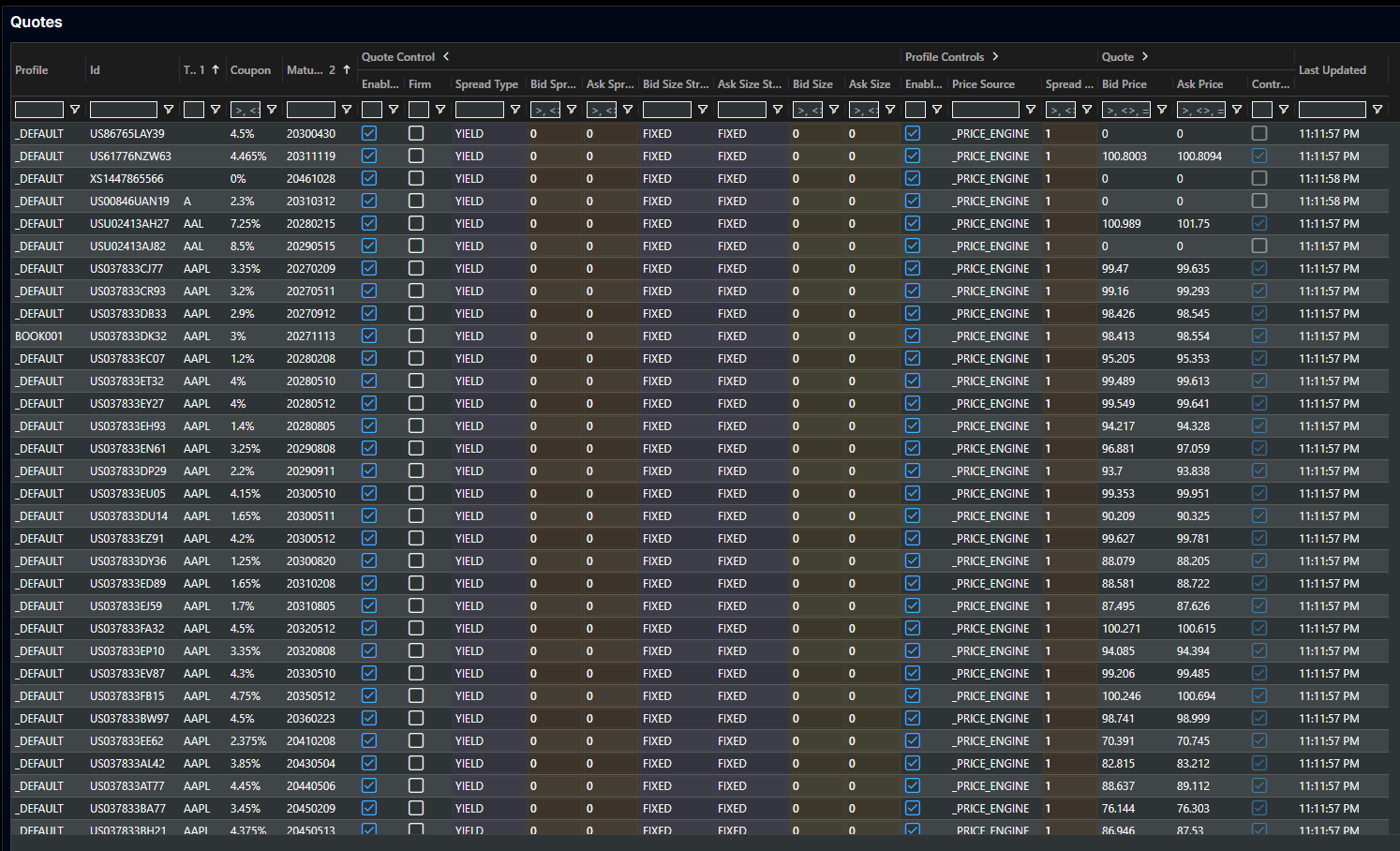
If you have enabled the quote-engine key-ui module (instructions here), then you can view all tier 1 settings in Quotes page in key-ui:
New Instrument Defaults
When a new instrument arrives, Quote Engine creates a QuoteControl for each tier by copying from the profile default QuoteControl (the QuoteControl whose instrumentId equals the profile name). This allows a desk to pre-configure default spread and size settings at the profile level so that new instruments inherit them automatically.
To set defaults for a profile, edit the QuoteControl row whose instrumentId matches the profile name (e.g. BOOK001).
New instruments inherit their defaults from the profile QuoteControl at the time they are first added. Subsequent changes to the profile default do not retroactively update existing instrument QuoteControls.
If you have enabled the quote-engine key-ui module (instructions here), then you can also set these in Quote Profiles page in key-ui:

Resolved Quote Control
Quote Engine computes a KsQuoteEngine.ResolvedQuoteControl for each instrument and tier by combining:
- The instrument's raw
QuoteControlsettings - The instrument's
QuoteProfilesettings (price source, multipliers, reference tier) - The master profile (
_MASTER_) global flags - Optionally, a reference tier's
ResolvedQuoteControl(see Reference Tier Sync below)
The resolved control is what is actually used when calculating and publishing quotes. It is published back to the platform so UI components can display the effective state.
Enabled and Firm Flags
The output quote is only enabled=true when all three of the following are true:
enabled = masterProfile.enabled AND quoteProfile.enabled AND quoteControl.enabled
Similarly for firm:
firm = masterProfile.firm AND quoteProfile.firm AND quoteControl.firm
This means the master profile and quote profile act as global kill switches that override any per-instrument setting.
Size Model
The quoted bid and ask sizes are computed independently using their respective strategies. The sizeMultiplier from the resolved QuoteProfile is applied on top.
| Strategy | Bid/Ask Size |
|---|---|
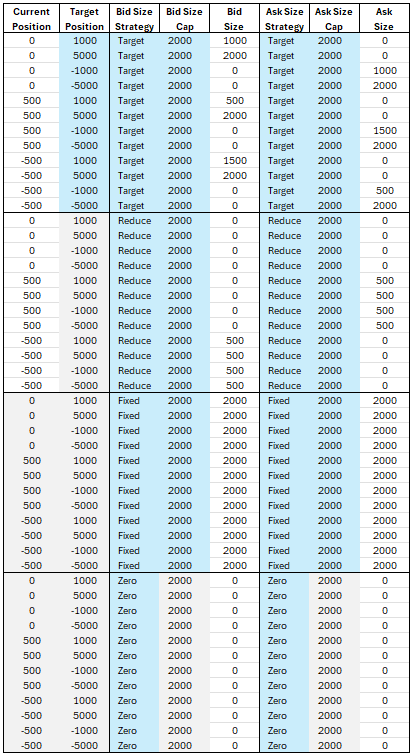
ZERO | Always 0 — no size published |
FIXED | sizeCap × sizeMultiplier — always a constant size |
TARGET | Position-based: targets toward targetPosition (requires position source) |
REDUCE | Position-based: reduces toward zero (requires position source) |
The following table illustrates how FIXED, TARGET, REDUCE, and ZERO interact with current and target positions:
Reference Tier Sync
When a QuoteProfile sets referenceTier to a different tier, Quote Engine subscribes to the reference tier's ResolvedQuoteControl and syncs selected settings from it. This enables one tier to act as a master template for other tiers.
The QuoteControlReferenceFlags on the QuoteProfile determine which fields are synced:
| Flag | Sync Behaviour |
|---|---|
enabled | Tier enabled = (own enabled) AND (ref enabled). The tier is only enabled if both the tier itself and the reference tier are enabled. This means disabling the reference tier disables all tiers that reference it. |
firm | Tier firm = (own firm) AND (ref firm). Both must be firm for the quote to be marked firm. |
bidAskSpread | If the tier's own bidSpread and askSpread are both zero, they are copied from the reference tier (including spreadType). If either is non-zero, the tier's own values take precedence. |
bidAskSizeStrategy | If the tier's own bid and ask size strategies are both null/UNKNOWN, they are copied from the reference tier. Non-UNKNOWN values take precedence. |
bidAskSizeCap | If the tier's own bidSizeCap and askSizeCap are both zero, they are copied from the reference tier. Non-zero values take precedence. |
targetPosition | If the tier's own targetPosition is zero, it is copied from the reference tier. A non-zero local value takes precedence. |
Reference tier sync behaves as a fallback: a setting is only inherited from the reference tier when the current tier's own value is zero or not set. This means:
- Setting a non-zero value on a tier overrides the reference — no further sync happens for that field.
- Resetting a value back to zero causes the tier to fall back to the reference again.