Price Engine
Overview
Price Engine (PE) is the central real-time pricing service for the KeySquare platform. It manages per-instrument price controls and produces bid/mid/ask prices and yields for Fixed Income Bonds (fixed maturity, callable, and floating rate).
PE combines three inputs to produce a live price:
- Instrument data — sourced from Static Data Server, including coupon, maturity, benchmark, and settlement conventions
- Calculation parameters — per-instrument
PriceControlrecords that define the pricing model, adjustments, and workout methodology - Market prices / yields — published by one or more external Data Providers over the platform bus
For each priced instrument, PE optionally sends a ValuationRequest to Analytics Service to compute yield and PV01 from the resulting clean price.
Installation
Price Engine can be run via binaries or Docker.
The package for this component is
keysquare-app-price-engine-{version}.tar.gz.
Please reach out to us if you'd like to try price-engine.
Please follow the instructions in deployment guide on how to install components.
Remember to register the new application. The simplest way is to import the app-permissions.json included in the component's package.
Entitlements
The following entitlements must be configured in KeyAccess for the price-engine application.
If you imported the permissions using the supplied
app-permissions.jsonthen most of these should already be set up for you. However, any custom data providers will need to be added. See the Data Provider guide.
Simplified
| PUB/SUB | Schema | Source | Group |
|---|---|---|---|
| SUB | * | * | price-engine |
| SUB | KsPricing.PriceProfile | price-engine | * |
| SUB | KsPricing.PriceControl | price-engine | * |
| SUB | KsCanonical.Price | * | * |
| PUB | * | price-engine | * |
Full Detail
| PUB/SUB | Schema | Source | Group |
|---|---|---|---|
| SUB | KsPricing.* (RPC Requests) | * | price-engine |
| SUB | KsPricing.* (RPC Responses) | analytics-service | price-engine |
| SUB | KsStaticDataServer.InstrumentIdReverseMapping | static-data-server | * |
| SUB | KsCanonical.InstrumentProfile | static-data-server | * |
| SUB | KsCanonical.Instrument | static-data-server | * |
| SUB | KsCanonical.BusinessDate | static-data-server | * |
| SUB | KsCanonical.Index | static-data-server | * |
| SUB | KsPricing.Curve | curve-engine | * |
| SUB | KsCanonical.Price | {data-provider} | * |
| SUB | KsPricing.PriceProfile | price-engine | * |
| SUB | KsPricing.PriceControl | price-engine | * |
| SUB | KsPricing.ResolvedPriceControl | price-engine | * |
| PUB | KsPricing.* (RPC Responses) | price-engine | * |
| PUB | KsPricing.* (RPC Requests) | price-engine | analytics-service |
| PUB | KsCanonical.Price | price-engine | * |
| PUB | KsPricing.PriceProfile | price-engine | * |
| PUB | KsPricing.PriceControl | price-engine | * |
| PUB | KsPricing.ResolvedPriceControl | price-engine | * |
Startup Dependencies
PE depends on keysquare-platform and Static Data Server being healthy before it starts.
In a typical platform boot sequence:
aeron-media-driverkey-accesssequencerrelay-cache,relay-livestatic-data-serverprice-engine← starts here
PE signals readiness via a ReadinessState.READY monitoring event once all instrument subscriptions are complete.
Price Engine will publish prices with ok=false while it is waiting for Analytics Service to return valuation results. Monitor ApplicationStatus on PE to check health: LivenessState.ONLINE + ReadinessState.READY indicates it is fully operational.
System Interaction
Workflow
Managing Prices
Price Engine maintains one PriceControl record per instrument, specifying the pricing model, spread adjustments, and workout methodology. Controls are grouped into Price Profiles that share yield conventions and new-instrument defaults.
See the dedicated pages for technical details:
- Price Controls & Resolved Price Controls — field reference, all pricing models, logical model diagrams, recalculation triggers, and resolved control assembly
- Price Profiles — yield conventions, curve settings, and new instrument defaults
Troubleshooting
When price.ok=false, the price.message field explains why Price Engine could not produce a valid price. Messages may be concatenated when multiple conditions apply.
Resolved PriceControl Validation
These errors appear before any pricing calculation and indicate a configuration or data-availability issue.
| Message | Reason | Resolution |
|---|---|---|
Instrument not found | Instrument data has not yet arrived from Static Data Server | Wait for SDS ReadinessState.READY |
Benchmark instrument not found | Instrument references a benchmark ID that has not been received | Verify the benchmark is configured in SDS |
Price topic not found | Price source name cannot be resolved to a platform topic | Check KS_PE_PRICE_SOURCES for a matching source name |
Benchmark price topic not found | Benchmark price source cannot be resolved to a topic | Verify benchmark source name in KS_PE_PRICE_SOURCES |
Invalid model | model field is UNKNOWN or unset | Set a valid pricing model |
Invalid side | side field is UNKNOWN or unset | Set a valid driver side |
Invalid spread type | spreadType is UNKNOWN or unset | Set YIELD or PRICE |
Invalid workout type | workoutType is UNKNOWN or unset | Set a valid workout type |
Invalid workout date | workoutType = MANUAL but workoutDate is zero | Supply a valid workout date |
No profile set | Instrument has no profileName | Assign a Price Profile in Static Data Server |
Price profile not found | Profile name is set but PriceProfile has not been received | Verify the profile exists and PE has started |
FRN forecast curve topic not found | Float bond's reference index has no forecast curve | Configure forecastCurve on the index in SDS |
Pricing Model Errors
| Message | Reason | Resolution |
|---|---|---|
Source Price is missing | Model is SOURCE or PASSTHROUGH but source price data has not arrived | Verify priceSource is configured and the data provider is running |
Invalid Price | Source price bid and ask are both zero or NaN | Check data provider health for the affected instrument |
Invalid Price and Yield | SOURCE + YIELD mode: both price and yield from source are invalid | Check data provider is publishing yield data |
Benchmark Price is missing | Model is BENCHMARK but no benchmark price has been received | Confirm benchmark instrument is being priced and benchmarkPriceSource is set |
Invalid Benchmark Yield | Benchmark price has no valid yield | Ensure the benchmark data provider publishes yield values |
Benchmark Pricing Model not supported for CouponType = Float | Float bonds cannot use the BENCHMARK model | Switch to DISCOUNT_MARGIN for floating rate bonds |
Manual Pricing Model does not support SpreadType = Yield for CouponType = Float - Please use Discount Margin Pricing Model | MANUAL model with spreadType = YIELD is invalid for float bonds | Use DISCOUNT_MARGIN model or set spreadType = PRICE |
Adjustment / Drivers must be supplied in Yield terms - Please check the spreadType set | BENCHMARK model requires spreadType = YIELD or SPREAD | Update spreadType |
Adjustment / Drivers must be supplied in Discount Margin terms - Please check the spreadType set. | DISCOUNT_MARGIN model requires spreadType = YIELD or SPREAD | Update spreadType |
Discount Margin Pricing Model not supported for CouponType <> Float | DISCOUNT_MARGIN is only valid for floating rate bonds | Use MANUAL, SOURCE, or BENCHMARK for non-float bonds |
Spread Type not supported | spreadType is set to an unsupported value for this model | Set spreadType to YIELD or PRICE |
Invalid Input | MANUAL model: bid/mid/ask spread values are NaN or missing | Supply valid adjustment values in the PriceControl |
Unsupported pricing model | Model is unrecognised | Set a supported model: MANUAL, SOURCE, BENCHMARK, PASSTHROUGH, or DISCOUNT_MARGIN |
Invalid Bid / Invalid Ask / Invalid Mid / Invalid Bid or Ask | The designated primary side has no valid value | Check that the data source provides data for the configured driver side |
Invalid Pricing Side | Side field is set to an invalid value | Set a valid driver side |
Analytics Service Interaction
| Message | Reason | Resolution |
|---|---|---|
Analytics Service unavailable - Can't calculate Workout Date | AS is offline; PE cannot determine the workout date for a callable bond | Verify Analytics Service is running and healthy |
Invalid Price - Can't calculate Workout Date | Source price is invalid; PE cannot send a workout date request | Fix the source price issue first |
Failed to get workout date. <detail> | AS returned an error computing the workout date | Check Analytics Service logs for the specific instrument |
Workout Date Pending | A workout date request is in-flight to AS | Transient — resolves when AS responds |
Analytics Service unavailable | AS is offline or disconnected during a yield/price conversion | Start Analytics Service and wait for reconnection |
Invalid Price - Can't calculate Yield | Price is invalid before sending price-to-yield request | Fix the source price issue |
Price to Yield failed: <detail> | AS returned an error on price-to-yield conversion | See Analytics Service troubleshooting |
Price to Yield requested | A price-to-yield request is in-flight | Transient |
Invalid Yield - Can't calculate Price | Yield is invalid before sending yield-to-price request | Ensure the source publishes valid yield data |
Yield to Price failed. <detail> | AS returned an error on yield-to-price conversion | See Analytics Service troubleshooting |
Yield to Price requested | A yield-to-price request is in-flight | Transient |
Invalid Price - Can't calculate DM | Price is invalid before sending price-to-discount-margin request | Fix the source price issue |
Price to DM failed: <detail> | AS returned an error on price-to-DM conversion | See Analytics Service troubleshooting |
Price to DM requested | A price-to-DM request is in-flight | Transient |
Invalid Discount - Can't calculate Price | Discount margin is invalid before sending DM-to-price request | Verify DM input values |
Discount to Price failed: <detail> | AS returned an error on DM-to-price conversion | See Analytics Service troubleshooting |
DM to Price requested | A DM-to-price request is in-flight | Transient |
Invalid Workout Date | Computed workout date is zero — bond has no valid redemption schedule | Verify maturity/call date data in Static Data Server |
User Interface
PE key-ui module ships two pre-canned views that can be used as a starting point for your pricing views. The module named price-engine provides these as two pages:
- Prices — per-instrument price controls, live prices, yields, PV01, spreads, and position data
- Price Profiles — group-level yield convention and curve configuration
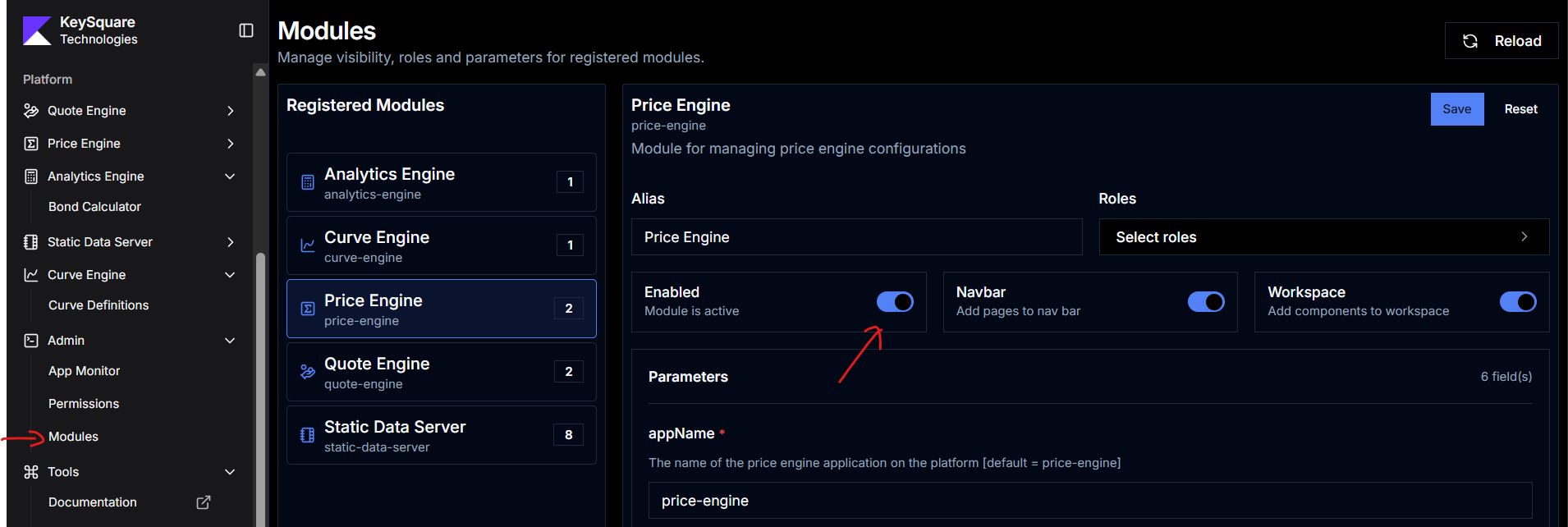
To enable the price-engine user interface:
- Log in to Key UI with an admin account
- Navigate to Admin → Modules -> Add Module
- Select Price Engine from the module list
- Toggle Enabled on and click Save
- Ensure the
appNameparameter matches the registered application name (default:price-engine)
RPC Functions
| RPC Name | Group | Description |
|---|---|---|
GetPriceSources | Operational | Returns the list of configured price source names |
GetPrice | Price | Returns the current price for a given instrumentId |
Detailed Topics
- Price Controls — PriceControl field reference, all pricing models, logical model diagrams, recalculation triggers, and ResolvedPriceControl assembly
- Price Profiles — yield conventions, curve settings, and new instrument defaults
- Prices View — user guide for the Prices grid: column reference, editing controls, and driver side walkthrough
- Price Profiles View — user guide for the Price Profiles grid
- Configuration Reference — all
KS_PE_*environment variables and module parameters - Data Provider — how to implement
PriceDataProviderand contribute prices to the platform