Static Data Server
Overview
Static Data Server (SDS) is the central reference data service for the KeySquare platform. It maintains the canonical store for all static and semi-static data that downstream services — pricing, risk, execution, and reporting — depend on.
Every piece of data managed by SDS can be added (AddRequest) or edited (EditRequest) via the platform API.
Simple user-interface is also available in Key Ui to manage all SDS data.
SDS owns the authoritative versions of:
- Instruments — Fixed Income Bonds and Interest Rate Swaps (canonical
Instrument) - Instrument Profiles — Display and formatting conventions (value type, precision, close time) per group of instruments
- Instrument Aliases — Custom name-to-instrument-id mappings
- Business Dates — Per-currency current and next business dates, with automatic daily roll (canonical
BusinessDate) - Holiday Calendars — Named calendars with weekend rules and explicit holiday date lists (canonical
HolidayCalendar) - Reference Indices — Floating rate index definitions (e.g. SOFR, EURIBOR) (canonical
Index) - Index Fixings — Historical rate fixings for each reference index (canonical
IndexFixing)
All data is persisted in a supported database (QuestDB or Oracle) and re-published on restart, ensuring consumers always receive a full snapshot.
Installation
Static Data Server can be run via binaries or docker.
The package for this component is
keysquare-app-static-data-server-{version}.tar.gz.
Please reach out to us if you'd like to try static-data-server
Please follow the instructions in deployment guide on how to install components.
Remember to register the new application. The simplest way to do this is by importing the app-permissions.json included in the components's package.
Entitlements
The following entitlements must be configured in KeyAccess for the static-data-server application.
If you imported the permissions using the supplied
app-permissions.jsonthen most of these should already be setup for you. However, be aware that any custom data-providers will need to be setup. See feeding data section for more information.
Simplified
| PUB/SUB | Schema | Source | Group |
|---|---|---|---|
| SUB | * | * | static-data-server |
| SUB | KsCanonical.Instrument | * | * |
| PUB | * | static-data-server | * |
Full Detail
| PUB/SUB | Schema | Source | Group |
|---|---|---|---|
| SUB | KsProtocol.AddRequest | * | static-data-server |
| SUB | KsStaticDataServer.* (RPC requests) | * | static-data-server |
| SUB | KsCanonical.Instrument | {data-provider} | * |
| PUB | KsProtocol.MessageStoreEnvelope | static-data-server | * |
| PUB | KsProtocol.AddResponse | static-data-server | * |
| PUB | KsStaticDataServer.* (RPC responses) | static-data-server | * |
| PUB | KsStaticDataServer.* (RPC requests) | * | {data-provider} |
| PUB | KsStaticDataServer.InstrumentIdReverseMapping | static-data-server | * |
| PUB | KsStaticDataServer.InstrumentWish | static-data-server | * |
| PUB | KsCanonical.InstrumentProfile | static-data-server | * |
| PUB | KsCanonical.Instrument | static-data-server | * |
| PUB | KsCanonical.BusinessDate | static-data-server | * |
| PUB | KsCanonical.HolidayCalendar | static-data-server | * |
Startup Dependencies
SDS depends on keysquare-platform and configured database being healthy before it starts.
In a typical platform boot sequence:
aeron-media-driverkey-accesssequencerrelay-cache,relay-livestatic-data-server← starts here
SDS signals readiness via a ReadinessState.READY monitoring event.
Applications should monitor static data server's ApplicationStatus when making requests. LivenessState.ONLINE and ReadinessState.READY indicate the service is healthy
Feeding Data
SDS acts as an aggregator and enrichment layer between external data providers and platform consumers.
Recommended way to feed data to SDS is to use the provided Java data-provider-api.
For all workflows (except realtime instrument refresh), no additional configuration is required in SDS.
Note: you will need to permission your data-provider application appropriately.
See instruments for details of all instrument workflows.
See data provider for details on how to setup a custom data provider.
User Interface
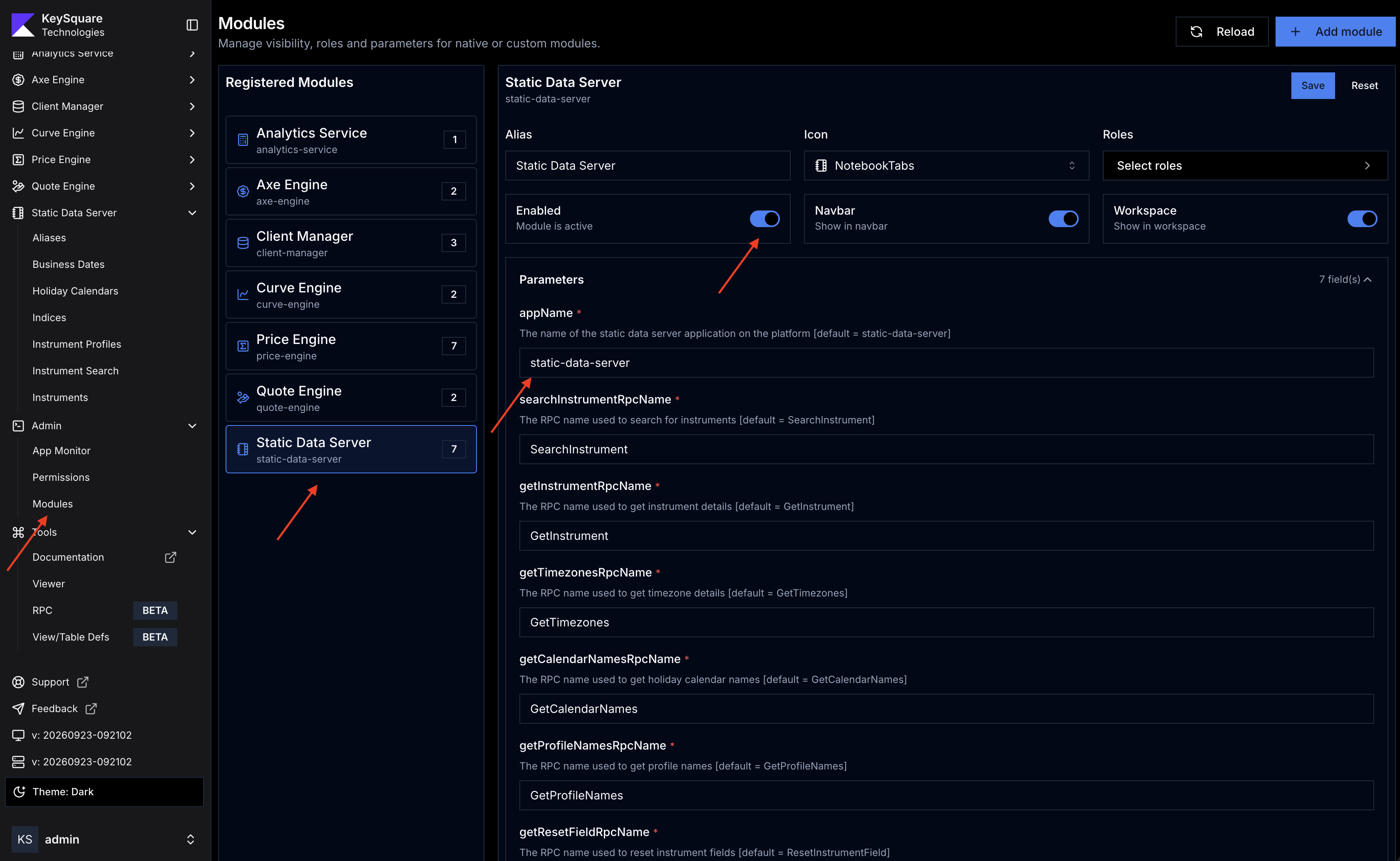
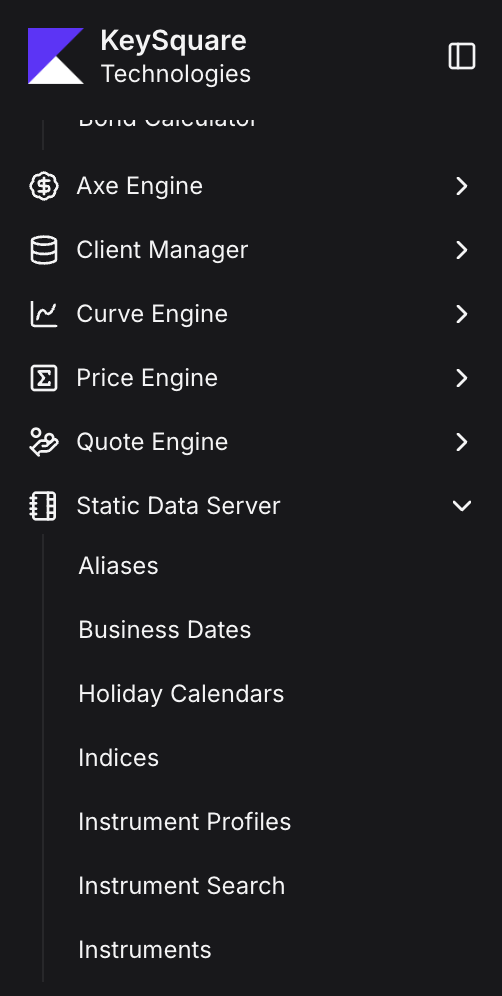
SDS data is viewable and editable in Key UI under the module named static-data-server. From this module you can:
- Browse and edit instruments, business dates, calendars, profiles, indices, and fixings
- Search for instruments locally or via external data providers
- Manage instrument aliases
- Manually roll business dates
To enable the static-data-server user interface:
- Login to Key Ui using an account that has admin roles
- Navigate to
Admin → Modules -> Add Module - Click on
Static Data Serverfrom module list - Enable the module and hit
Save - Note: make sure the appName in module configuration matches the app name you used when installing the application
- Navigate to
If enabled successfully, you'll see the following new menu items in the side-bar:
Topic Structure
| Data Type | topicSource | topicGroup | topicId |
|---|---|---|---|
| Instrument | static-data-server | {type}{currency} e.g. BUSD | instrumentId |
| Business Date | static-data-server | static-data-server | {currency} e.g. USD |
| Holiday Calendar | static-data-server | static-data-server | {calendarName} |
| Instrument Profile | static-data-server | static-data-server | {profileName} |
| Reference Index | static-data-server | static-data-server | {indexName} |
| Index Fixing | static-data-server | {date} | {indexName} |
| Instrument Alias | static-data-server | static-data-server | {alias} |
Instrument topicGroup is prefixed by instrument type:
| Instrument Type | Prefix | Example topicGroup |
|---|---|---|
| Bond | B | BUSD, BGBP, BEUR |
| IR Swap | S | SUSD, SGBP |
| IR Future / Bond Future | F | FUSD |
Detailed Topics
- Instruments — Instrument lifecycle, ID generation, data providers, search, aliases
- Business Dates — Per-currency dates, auto-roll configuration, manual override
- Holiday Calendars — Calendar definitions, weekend rules, date adjustment
- Instrument Profiles — Display profiles, defaults, Bloomberg integration
- Indices & Fixings — Reference index definitions and historical fixings
- Configuration Reference — All
KS_SDS_*environment variables