Analytics Engine
Overview
Analytics Engine (AE) is the platform's fixed income valuation service. It acts as a high-performance calculation layer built on QuantLib, exposing a set of RPC functions that translate between market observables (clean price, yield, discount margin) and derived analytics (PV01, cashflows, workout date).
AE is a calculation server — it does not store or publish data of its own. It listens for platform data (instruments, business dates, yield curves, index fixings) and responds to on-demand requests from other services and from the Bond Calculator UI.
What AE provides:
- Price ↔ Yield conversions — clean price to yield to worst/maturity, yield to clean price
- Discount Margin — clean price to discount margin and back (floating rate bonds)
- PV01 — interest rate sensitivity from price or yield input
- Workout Date — determine the yield-to-worst redemption date from a clean price (callable bonds)
- Yields to Call Dates — yield computed for every possible redemption date
- Cashflow schedule — full coupon and principal payment dates and amounts
- Bond Diagnostics — raw internal state of the QuantLib bond model for troubleshooting
AE currently supports a single currency per instance. To value bonds in multiple currencies, deploy one AE instance per currency and configure each with KS_AE_CURRENCY.
Installation
Analytics Engine is distributed as a standalone binary or Docker image.
The package for this component is
analytics-engine-{version}.tar.gz.
Please reach out to us if you'd like to try analytics-engine.
Please follow the instructions in deployment guide on how to install components.
Remember to register the new application. The simplest way to do this is by importing the app-permissions.json included in the component's package.
Entitlements
The following entitlements must be configured in KeyAccess for the analytics-engine application.
If you imported the permissions using the supplied
app-permissions.jsonthen most of these should already be setup for you.
Simplified
| PUB/SUB | Schema | Source | Group |
|---|---|---|---|
| SUB | * | * | analytics-engine |
| SUB | * | static-data-server | * |
| SUB | * | curve-engine | * |
| PUB | * | analytics-engine | * |
Full Detail
| PUB/SUB | Schema | Source | Group |
|---|---|---|---|
| SUB | KsPricing.* (RPC Requests) | * | analytics-engine |
| SUB | KsStaticDataServer.InstrumentIdReverseMapping | static-data-server | * |
| SUB | KsCanonical.Instrument | static-data-server | * |
| SUB | KsCanonical.BusinessDates | static-data-server | * |
| SUB | KsCanonical.Index | static-data-server | * |
| SUB | KsCanonical.IndexFixing | static-data-server | * |
| SUB | KsPricing.Curve | curve-engine | * |
| PUB | KsPricing.* (RPC Responses) | analytics-engine | * |
Dependencies
AE depends on keysquare-platform and Static Data Server being healthy before it reaches READY.
In a typical platform boot sequence:
aeron-media-driverkey-accesssequencerrelay-cache,relay-livestatic-data-serveranalytics-engine← starts here
AE waits for SDS to signal LivenessState.ONLINE and ReadinessState.READY before subscribing to instruments, business dates, and indices. It signals its own ReadinessState.READY only after all instrument subscriptions are complete.
As evident from the entitlements, AE subscribes to the following data types from static data server:
- Instrument i.e. list of instruments to price
- Business Date i.e. current business or evaluation date
- Index + IndexFixing i.e. what indices to be aware of (for FRN support)
Additionally, AE subscribes to forecast curves published by Curve Engine. AE subscribes to forecast curve specified in forecastCurve field of the Index
Because AE loads the full instrument set on startup, it will not respond to valuation requests until all subscriptions to SDS are complete. Monitor ApplicationStatus to verify AE is ready before routing requests to it.
Supported Bond Types
- Fixed Maturity Fixed Coupon
- Fixed Maturity Float Coupon
- Callable Maturity Fixed Coupon
- Callable Maturity Float Coupon
- Callable Maturity Fixed-to-Float Coupon
Supported Valuations
- CLEAN_PRICE to YIELD
- CLEAN_PRICE to DISCOUNT_MARGIN
- CLEAN_PRICE to PV01
- YIELD to CLEAN_PRICE
- YIELD to PV01
- DISCOUNT_MARGIN TO CLEAN_PRICE
- DISCOUNT_MARGIN TO PV01
RPC Functions
Analytics Engine exposes six RPC functions.
| RPC Name | Description |
|---|---|
ValuationRequest | Price/yield/PV01/discount margin conversions |
ComputeWorkoutDate | Yield-to-worst redemption date from clean price |
ComputeYieldsToCallDates | Yield for every call date from clean price |
ComputeCashflows | Full coupon and principal schedule |
GetBondDiagnostics | Raw QuantLib model state as JSON |
GetBondDetails | Settlement date, maturity, accrued, cashflows |
ValuationRequest
The primary valuation RPC. Accepts an input value (clean price, yield, or discount margin) plus a list of metrics to compute, and returns all requested results in a single response.
Called by: Price Engine (every pricing cycle), Bond Calculator UI
Request:
| Field | Type | Description |
|---|---|---|
instrumentId | FullInstrumentIdentifier | Instrument to value. Resolved using ISIN, CUSIP, or platform ID |
currency | Currency | Must match the AE instance's configured currency |
valuationDate | int (YYYYMMDD) | Must match the current business date for the currency |
settlementDate | int (YYYYMMDD) | Settlement date override. 0 = use standard settlement days |
workoutDate | int (YYYYMMDD) | Redemption date to use. 0 = determine from yield to worst |
inputValueType | ValuationMetric | One of: CLEAN_PRICE, YIELD_TO_WORST, YIELD_TO_MATURITY, DISCOUNT_MARGIN |
inputValue | double | The input value corresponding to inputValueType |
requestsEntry | RequestsEntry[] | List of metrics to compute |
Supported inputValueType → requestType combinations:
| Input | Computable Outputs |
|---|---|
CLEAN_PRICE | YIELD_TO_WORST, YIELD_TO_MATURITY, PV01, DISCOUNT_MARGIN* |
YIELD_TO_WORST | CLEAN_PRICE, PV01 |
YIELD_TO_MATURITY | CLEAN_PRICE, PV01 |
DISCOUNT_MARGIN | CLEAN_PRICE, PV01 |
*DISCOUNT_MARGIN is only supported for floating rate bonds.
Response: ValuationResponse — contains ok flag and a resultsEntry list, one per requested metric. Each entry has its own ok and message field so partial failures are visible.
ComputeWorkoutDate
Determines the yield-to-worst redemption date for a callable bond from a given clean price. Price Engine uses this to establish which call date minimises the yield before computing YIELD_TO_WORST.
Called by: Price Engine (callable bonds only), Bond Calculator UI
Request:
| Field | Type | Description |
|---|---|---|
instrumentId | FullInstrumentIdentifier | Instrument to evaluate |
currency | Currency | Must match configured currency |
valuationDate | int (YYYYMMDD) | Current business date |
cleanPrice | double | Input clean price |
Response: ComputeWorkoutDateResponse — workoutDate is the resulting redemption date in YYYYMMDD format.
ComputeYieldsToCallDates
Computes the yield for every possible redemption date (all call dates plus maturity) from a single clean price. Useful for understanding option-adjusted behaviour across the call schedule.
Called by: Bond Calculator UI (Yields tab)
Request:
| Field | Type | Description |
|---|---|---|
instrumentId | FullInstrumentIdentifier | Must be a callable bond |
currency | Currency | |
valuationDate | int (YYYYMMDD) | |
cleanPrice | double | Input clean price |
Response: ComputeYieldsToCallDatesResponse — calculatedYieldsEntry list of (date, yield) pairs, one per redemption date.
ComputeCashflows
Returns the full projected cashflow schedule for a bond: all coupon payment dates and amounts plus the final principal repayment.
Called by: Bond Calculator UI (Cash Flows tab)
Request:
| Field | Type | Description |
|---|---|---|
instrumentId | FullInstrumentIdentifier | |
currency | Currency | |
valuationDate | int (YYYYMMDD) |
Response: ComputeCashFlowsResponse — cashflowsEntry list of (date, value) pairs.
GetBondDiagnostics
Returns the raw key-value state of the QuantLib bond model as a JSON string. This includes all inputs AE used to construct the bond (coupon rate, conventions, settlement, accrued amount, cashflows) and is useful for verifying that AE is interpreting instrument data correctly.
Called by: Bond Calculator UI (Diagnostics tab), developers via the RPC tool
Request:
| Field | Type | Description |
|---|---|---|
instrumentId | FullInstrumentIdentifier | |
currency | Currency | |
valuationDate | int (YYYYMMDD) |
Response: GetBondDiagnosticsResponse — details is a JSON string containing the full internal model state.
GetBondDetails
Returns high-level bond details including settlement date, maturity date, accrued amount, and the full cashflow schedule. A lighter-weight alternative to GetBondDiagnostics when you only need the structured outputs rather than the full internal state.
Called by: Developers and tools via the RPC tool
Request:
| Field | Type | Description |
|---|---|---|
instrumentId | FullInstrumentIdentifier | |
currency | Currency | |
valuationDate | int (YYYYMMDD) |
Response: GetBondDetailsResponse — settlement date, maturity date, accrued amount, and cashflow list.
Integration with Price Engine
Price Engine is the primary production consumer of Analytics Engine. On each pricing cycle, PE calls AE to convert the input price to yield and PV01:
Price Engine also subscribes to AE's ApplicationStatus to detect when AE becomes unavailable — it will continue publishing prices without analytics in degraded mode.
Troubleshooting
Analytics Engine surfaces errors in two ways: through the ok and message fields of each response, and through runtime exceptions thrown when a request cannot be processed.
Valuation Response Errors
Each entry in ValuationResponse.resultsEntry has its own ok and message field. A partial failure is possible — some metrics succeed while others fail within the same request.
| Message | Reason | Resolution |
|---|---|---|
Request currency does not match KS_AE_CURRENCY | UnsupportedOperationException: Unsupported currency: <currency> | Route requests to the AE instance configured for the correct currency |
valuationDate is zero in the request | IllegalArgumentException: No valuation date supplied | Ensure the requesting service has received a business date before sending valuation requests |
| Request's valuation date does not match AE's current business date | IllegalStateException: Requested valuation date: <date> does not match engine valuation date: <date> | This typically means a stale request arrived after a date rollover; the requesting service should retry after receiving the updated business date |
| Instrument ID in request is not known to AE | IllegalStateException: Couldn't find a bond with id: <id> | The instrument has not yet arrived from Static Data Server. Wait for AE to signal ReadinessState.READY before sending requests |
| Bond ID is blank | IllegalArgumentException: Id is blank | Ensure instrumentId is populated in the request |
Bond coupon type is not FLOAT | DISCOUNT_MARGIN metric requested for a fixed-coupon bond | Only request DISCOUNT_MARGIN for floating rate bonds |
Not a callable bond | YIELD_TO_WORST requested with no workout date and the bond is not callable | Supply a workoutDate, or only request YIELD_TO_MATURITY for non-callable bonds |
<id> is not a callable bonds | ComputeYieldsToCallDates called on a non-callable bond | Only call ComputeYieldsToCallDates for bonds with a call schedule |
Input value type not supported | The inputValueType cannot be converted to the requested output metric | Check the supported input → output combinations table |
Unsupported metric | An unrecognised ValuationMetric was included in requestsEntry | Use a supported metric: CLEAN_PRICE, YIELD_TO_WORST, YIELD_TO_MATURITY, PV01, DISCOUNT_MARGIN |
Non-standard settle date not supported | settlementDate field is non-zero in the request | Set settlementDate = 0 to use standard settlement conventions |
<QuantLib exception message> | QuantLib threw an exception (e.g. convergence failure, invalid date, coupon schedule error) | Check bond static data in Static Data Server for accuracy |
Startup and Connectivity
These errors are thrown as exceptions and will appear in AE logs rather than in response messages:
| Symptom | Likely Cause | Resolution |
|---|---|---|
AE stays in ReadinessState.NOT_READY | Not connected to Static Data Server, or SDS is not yet READY | Verify SDS is running and healthy. Check AE logs for Static Data Server ready message |
| AE received 0 business dates | SDS is running but has no business date for the configured currency | Ensure SDS has a business date configured for KS_AE_CURRENCY |
| AE received 0 instruments | SDS is running but the configured KS_AE_INSTRUMENT_TOPIC_GROUPS does not match any SDS groups | Verify KS_AE_INSTRUMENT_TOPIC_GROUPS matches the groups SDS publishes to |
Price Engine reports Analytics Engine unavailable | AE is not online or not reachable on the platform bus | Confirm AE is running, registered in KeyAccess, and PE is subscribed to analytics-engine application status |
Implementing a Custom Analytics Engine
If you need to replace or extend the default Analytics Engine — for example, to support additional instrument types or a different pricing library — you can build your own service that implements the same RPC interface.
Your application must:
- Register the same RPC handlers with the RPC names and schema types listed in the RPC Functions above.
- Configure Price Engine to point at your app using
KS_ANALYTICS_ENGINE_TOPIC_SOURCE. - Permission your app as described in the Entitlements section.
The request and response DTOs are defined in the ks-model-pricing artifact:
<dependency>
  <groupId>trading.keysquare</groupId>
  <artifactId>ks-model-pricing</artifactId>
  <version>${version}</version>
</dependency>
User Interface
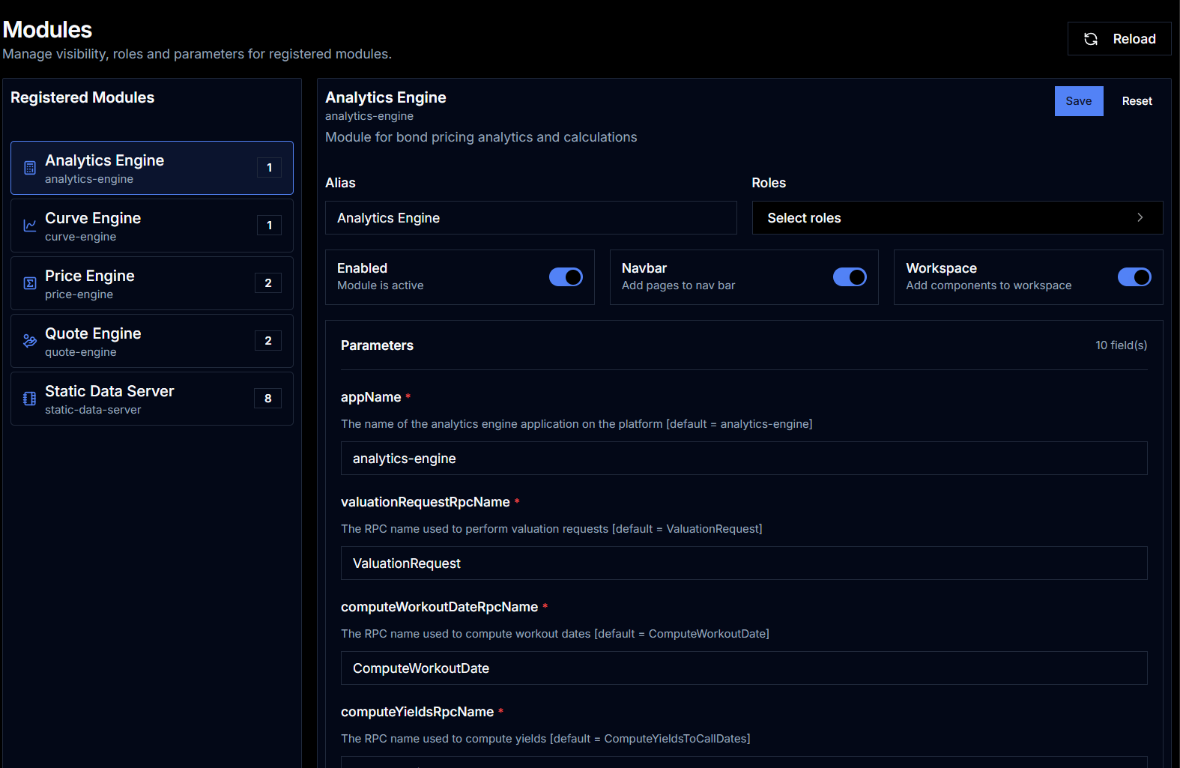
Analytics Engine has a UI module in Key UI. See enabling the module below, and the Bond Calculator page for a detailed walkthrough.
Enabling the Module
- Update the configuration for
web-data-server:- Append
analytics-enginetoKS_WEB_DATA_SERVER_UI_MODULES(comma-separated)
e.g.KS_WEB_DATA_SERVER_UI_MODULES=analytics-engine,static-data-server,price-engine - Restart
web-data-server
- Append
- Log in to Key UI with an admin account
- Navigate to Admin → Modules
- Select Analytics Engine from the module list
- Toggle Enabled on and click Save
Detailed Topics
- Bond Calculator — how to use the Bond Calculator UI page
- Configuration Reference — all
KS_AE_*environment variables