Prices View
Overview
If you enabled the price-engine key-ui module (instructions here), you should have two new links in the left hand menu. The Prices page has a pre-canned view that can be used for managing real-time bond pricing.
First time, a user visits this page in key-ui, a view definition is created called either price-management-view or price-management-view-with-quotes depending on whether quotes were enabled in the module configuration. This view definition will be owned by the user (but can be shared or transferred).
Below we describe the features of this view. You, of course, have the flexibility to modify this view or create your own.
The supplied view displays one row per instrument and joins together multiple data sources in a single view:
| Source | Description |
|---|---|
Instrument | Static reference data from Static Data Server |
PriceControl | Per-instrument pricing parameters (model, adjustments, workout settings) — editable |
ResolvedPriceControl | Computed spread breakdown (bid/mid/ask) derived from the active PriceControl |
Price | Live output prices, yields, PV01, and status flags published by Price Engine |
Position | Live position for the instrument, where bookId = instrument.profileName |
Quote + QuoteControl | Output of quote-engine - only included if enabled in module configuration |
Rows are grouped by Ticker by default and sorted by Maturity Date within each group.
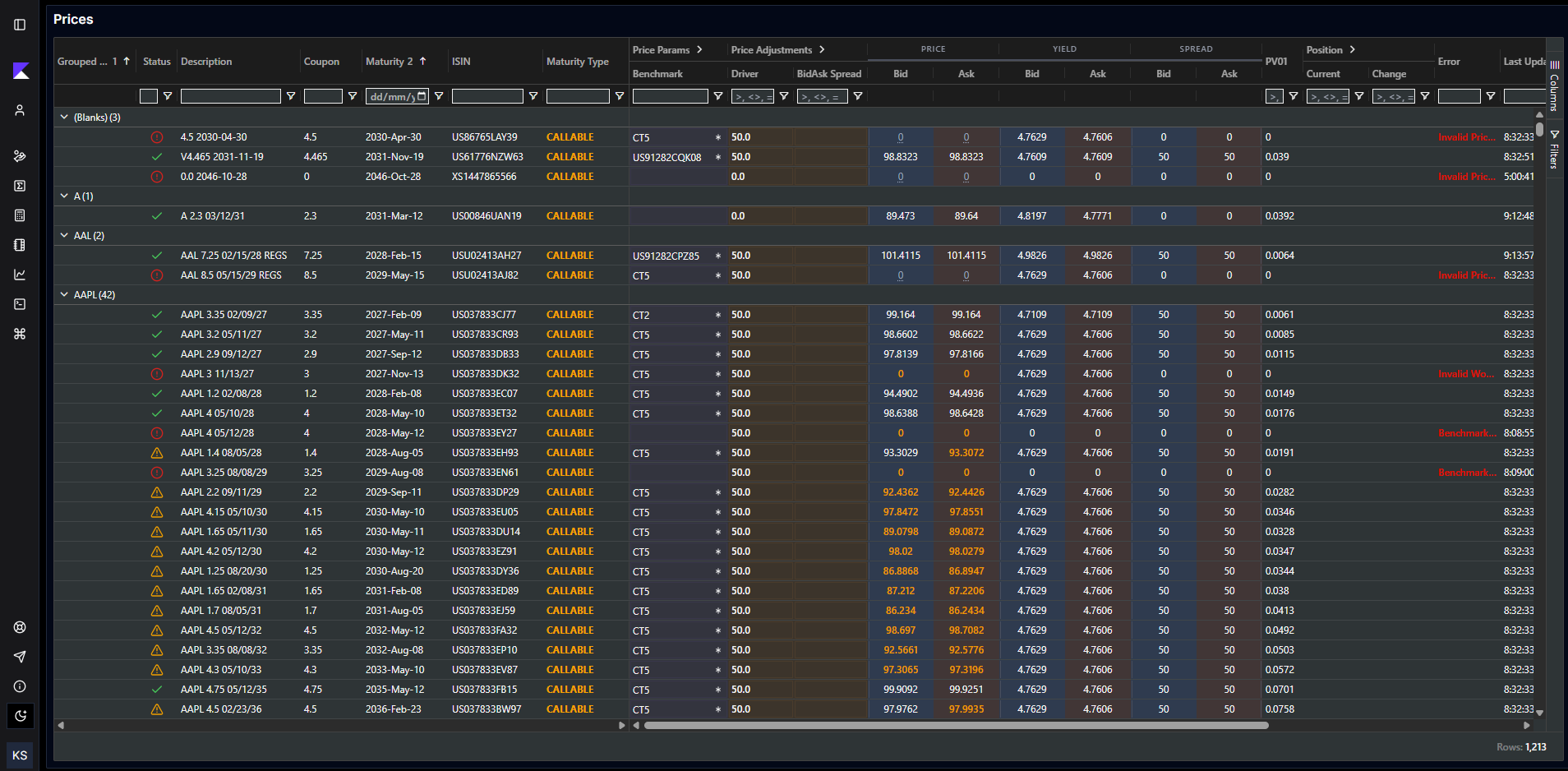
Column Reference
Identity Columns
| Column | Source | Description |
|---|---|---|
| Profile | instrument.profileName | Instrument Profile name. Editable dropdown populated from Static Data Server profiles. Controls display formatting and yield convention. |
| Status | Computed | Traffic-light status. Green = price OK. Red = price error (hover for message). Orange = trade restriction flag set. |
| Description | instrument.description | Human-readable bond description, e.g. AAPL 4.5 2035/08/05. |
| Coupon | instrument.couponRate | Coupon rate. |
| Maturity | instrument.maturityDate | Maturity date (formatted). Default sort column. |
| ISIN | instrument.isin | ISO 6166 identifier. |
| Maturity Type | instrument.maturityType | FIXED (blue), CALLABLE (orange/bold), FLOATING, etc. |
| Coupon Type | instrument.couponType | FIXED, FLOATING, ZERO, etc. |
| Next Coupon | instrument.nextCouponDate | Next coupon payment date. Hidden by default. |
| Next Option | instrument.nextOptionDate | Next call/put date. Hidden by default. |
| CUSIP | instrument.cusip | CUSIP identifier. Hidden by default. |
| Instrument Id | instrument.instrumentId | Platform-assigned instrument ID (e.g. BUSD00001). Hidden by default. |
| Last Updated | price._meta.publicationNanoTime | Timestamp of the most recent price update (falls back to instrument publication time). |
| Error | price.message | Error message if ok=false. Displayed in red. |
| OK | price.ok | Boolean flag. Hidden by default; visible as the Status icon instead. |
| Notes | price_control.note | Free-text notes field. Editable. Hidden by default. |
Price Params Group
This group contains all the controls that determine how an instrument is priced. It collapses to show only the most essential fields.
| Column | Source | Editable | Values | Description |
|---|---|---|---|---|
| Benchmark | instrument.benchmarkInstrumentId | ✅ | Any instrument alias/ID | Reference benchmark instrument. Displayed as alias where available. Required when Model = BENCHMARK. Highlighted in bold when model is not BENCHMARK. |
| Model | price_control.model | ✅ | SOURCE, BENCHMARK, MANUAL | Pricing model. See Pricing Models for detail. Highlighted in bold/different style when MANUAL. |
| Price Source | price_control.priceSource | ✅ | Configured sources (dropdown) | Price to use as input. Required for SOURCE model and for computing workout date on non-fixed-maturity bonds. |
| Bmk Price Source | price_control.benchmarkPriceSource | ✅ | Configured sources (dropdown) | Price to use for benchmark prices. |
| Workout Type | price_control.workoutType | ✅ | WORST, NEXT_CALL, MATURITY, MANUAL | How the redemption/workout date is determined. For fixed-maturity bonds, maturity date is always used regardless of this setting. Highlighted in bold when MANUAL. |
| Workout Date | Computed / price_control.workoutDate | ✅ (when MANUAL) | Date | Displays the manual override date when Workout Type is MANUAL; otherwise shows the effective workout date from the latest Price. Only editable when Workout Type is MANUAL. |
| Workout Override | price_control.workoutDate | ✅ | Integer (YYYYMMDD) | Raw numeric workout date override. Hidden by default; use the computed Workout Date column instead. |
| Effective Workout Date | price.redemptionDate | ❌ | Date | The actual workout date used by Price Engine in the last calculation. Hidden by default. |
| Driver Side | price_control.side | ✅ | MID, BID, ASK, SIDE, SIDE_SIDE | Controls which side drives pricing and how adjustments map to bid/mid/ask. See Pricing Models. |
Price Adjustments Group
This group controls the spread adjustments applied to generate bid/mid/ask prices. It collapses to show only the most essential fields.
| Column | Source | Editable | Visibility | Description |
|---|---|---|---|---|
| Driver | price_control.adjustment1 | ✅ | Always | Primary spread/price/yield adjustment. Interpretation depends on Model and Driver Side. See Pricing Models. |
| Driver2 | price_control.adjustment2 | ✅ | Only when Driver Side = SIDE_SIDE | Independent adjustment for the ask/offer side. Only visible and editable when Driver Side is SIDE_SIDE. |
| Spread Type | price_control.spreadType | ✅ | Always | YIELD or PRICE. Controls whether adjustment1/adjustment2 are yield-based (basis points) or price-based. For SOURCE model, also controls whether source price or yield drives the output. |
| BidAsk Spread | price_control.adjustment2 | ✅ | When Driver Side ≠ SIDE and ≠ SIDE_SIDE | The full bid–ask spread in bps/price. Hidden when side is SIDE or SIDE_SIDE. Shares underlying field with Driver2. |
| Bid Spread | resolved_price_control.bidSpread | ❌ | Hidden by default | Computed bid spread to benchmark. Read-only output from ResolvedPriceControl. |
| Mid Spread | resolved_price_control.midSpread | ❌ | Hidden by default | Computed mid spread to benchmark. Read-only output. |
| Ask Spread | resolved_price_control.askSpread | ❌ | Hidden by default | Computed ask spread to benchmark. Read-only output. |
Output Price Columns
These columns display the computed prices and yields published by Price Engine. They are read-only.
| Group | Column | Description |
|---|---|---|
| PRICE | Bid | Bid clean price |
| PRICE | Ask | Ask clean price |
| PRICE | Mid | Mid clean price. Hidden by default. |
| YIELD | Bid | Bid yield to worst (%) |
| YIELD | Ask | Ask yield to worst (%) |
| YIELD | Mid | Mid yield to worst. Hidden by default. |
| SPREAD | Bid | Bid spread to reference benchmark (bps) |
| SPREAD | Ask | Ask spread to reference benchmark (bps) |
| SPREAD | Mid Sprd | Mid spread to reference. Hidden by default. |
| — | PV01 | Dollar value of 1bp (price sensitivity to yield). |
| — | Settle Dt | Settlement date. Hidden by default. |
| — | Reference Index | Floating rate reference index (e.g. SOFR). Hidden by default. |
Position Columns (optional)
When a position server is connected, the Position group shows book-level position data per instrument/profile combination.
| Column | Description |
|---|---|
| Current | Current intraday position (notional) |
| SOD | Start-of-day position |
| Change | Intraday change (Current − SOD) |
Quote Columns (optional)
When the module parameter showQuoteEngine is enabled, additional columns for Quote Engine (Tier 1) appear:
| Group | Column | Description |
|---|---|---|
| Quote Control (Tier 1) | Enable | Whether quoting is enabled for this instrument |
| Quote Control (Tier 1) | Spread Type | YIELD or PRICE for quote spread |
| Quote Control (Tier 1) | Bid Spread | Quote bid spread |
| Quote Control (Tier 1) | Ask Spread | Quote ask spread |
| Quotes | Bid Price | Published quote bid price |
| Quotes | Ask Price | Published quote ask price |
| Quotes | Bid Size | Quote bid size |
| Quotes | Ask Size | Quote ask size |
| Quotes | Contributing | Whether the quote is being distributed |
| Quotes | Q Error | Quote Engine error message |
Driver Side Reference
| Driver Side | Editable Inputs | Derived Outputs |
|---|---|---|
MID | Driver (midSpread), BidAsk Spread (width) | bid = mid − width/2, ask = mid + width/2 |
BID | Driver (bidSpread), BidAsk Spread (width) | mid = bid + width/2, ask = bid + width |
ASK | Driver (askSpread), BidAsk Spread (width) | bid = ask − width, mid = ask − width/2 |
SIDE | Driver (bidSpread only) | ask side set to same as bid; no independent ask spread |
SIDE_SIDE | Driver (bidSpread), Driver2 (askSpread) | bid and ask are independently specified; no mid relationship enforced |
Editing Controls
All editable cells are highlighted with a subtle background colour to distinguish them from read-only output columns.
Inline Cell Editing
Click any editable cell to modify its value. Changes are saved to the platform message store on confirmation (Enter or clicking away). Each edit triggers a platform MessageEdit which is processed by Price Engine immediately.
Bump Actions (Driver)
Right-click the Driver column to access the bump menu:
| Action | Effect |
|---|---|
| +1bp | Increases Driver by 1 basis point |
| +5bp | Increases Driver by 5 basis points |
| −1bp | Decreases Driver by 1 basis point |
| −5bp | Decreases Driver by 5 basis points |
| Custom… | Prompts for a custom delta |
Bump actions can be applied to:
- Bump Selected — applies the delta to the selected row(s) only
- Bump All — applies the delta to all rows currently visible in the grid
Context Menu Actions
Right-click any row to access:
| Action | Description |
|---|---|
| View Instrument | Opens the instrument details panel in Static Data Server |
| View Benchmark | Opens the benchmark instrument details panel |
| Search Instrument | Opens instrument search to find and add a new instrument |
| Trading Restricted | Toggle the instrument's restricted flag (with reason prompt) |
| Sanctioned | Toggle the instrument's sanctioned flag (with reason prompt) |
| 15c2-11 Restricted | Toggle the SEC 15c2-11 restriction flag |